+261 34 49 905 79

Pinterest launches dashboard for businesses
Pinterest, the image sharing site, account 20 million users and attracts more and more major brands, seduced by its potential.
What could previously slow down the use of Pinterest was the lack of official statistics. Being active on Pinterest is a time-consuming activity. It is therefore important to be able to visualize the impact of this activity.
With Pinterest Web Analytics (analyze you web Pinterest), you can rate the ‘pinnings’ images from your website and how visitors interact with pins’ (pinned images)from your site. You can view the number of people who have pinned from your site ; the number of people who have seen these pins and especially the number of people who have visited your site from Pinterest.
Visualize the popularity of your images
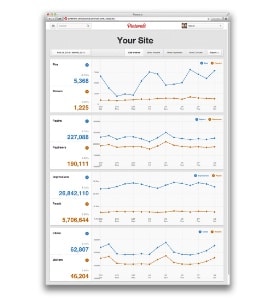
The table also shows a selection of what is re-pinned the most, most clicked and most recent pins. The objective is to visualize the popularity of your images. To access these statistics, your Pinterest account must be linked to a verified website (contact your webmaster) and be configured in English language (For now).
You must then adopt the new Pinterest interface (‘switch to the new look’ in your profile) and access the ‘analytics’ section’ (analyses). Pinterest represents significant communication potential, you still need to dedicate time to it. This new tool allows it to be used more efficiently.
Vanessa Guerrier-Buisine – source https://www.lhotellerie-restauration.fr